
Podcasts
Player
Playback controls and queue management
Rodel Reader provides a full-featured podcast player with playback controls, progress memory, and queue management.
Player Interface

The player is located at the bottom of the app, showing current episode information and control buttons.
Display Information
| Information | Description |
|---|---|
| Cover | Episode or podcast artwork |
| Title | Episode title |
| Podcast Name | Parent podcast name |
| Progress Bar | Current position and total duration |
Playback Controls
Basic Controls
| Control | Description |
|---|---|
| Play/Pause | Toggle playback state |
| Previous | Play previous episode in queue |
| Next | Play next episode in queue |
| Rewind | Skip backward by specified seconds |
| Forward | Skip forward by specified seconds |
Progress Control
- Drag progress bar: Jump to specified position
- Click progress bar: Jump to clicked position
Playback Speed
Adjust playback speed:
| Speed | Description |
|---|---|
| 0.5x | Half speed |
| 0.75x | Slow playback |
| 1.0x | Normal speed (default) |
| 1.25x | Slightly faster |
| 1.5x | Fast playback |
| 1.75x | Faster playback |
| 2.0x | Double speed |
Volume Control
| Control | Description |
|---|---|
| Volume slider | Adjust playback volume (0-100%) |
| Mute | Toggle mute on/off |
Playback Queue
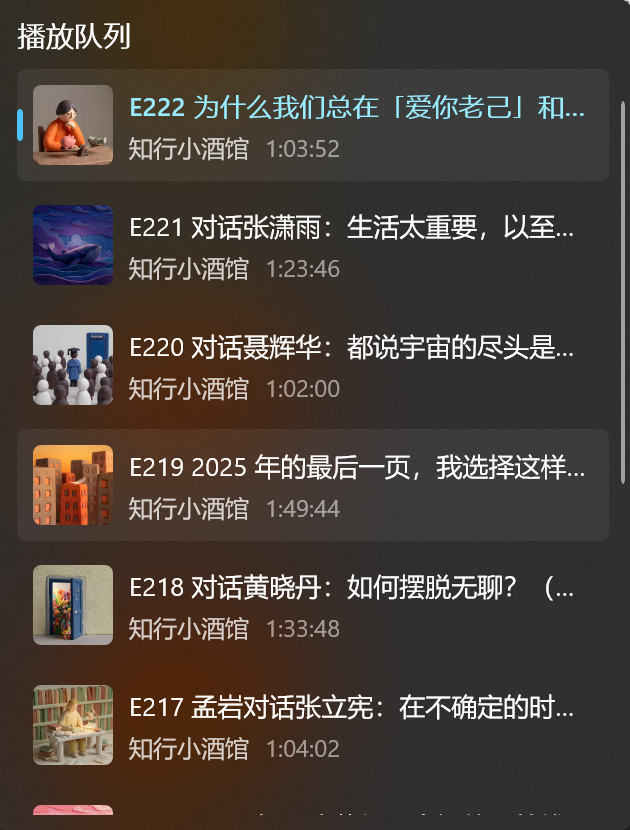
The playback queue manages episodes to be played.
View Queue
Click the Queue button on the player to open the playback queue panel.
Queue Operations
| Operation | Description |
|---|---|
| Add to queue | Right-click episode and select "Add to Queue" |
| Remove from queue | Click the remove button on queue item |
| Clear queue | Clear all pending episodes (keeps current) |
| Play specific item | Click an episode in queue to play immediately |
Queue Item Information
Each queue item shows:
| Information | Description |
|---|---|
| Cover | Episode artwork |
| Title | Episode title |
| Podcast Name | Parent podcast |
| Duration | Episode total duration |
Progress Memory
The player automatically records listening progress.
Auto-save
| Trigger | Description |
|---|---|
| Position change | Periodically saves current position |
| Pause playback | Saves position when paused |
| Switch episode | Saves previous episode progress |
| Close app | Saves current playback state |
Resume Playback
When reopening the app:
- Automatically restores last played episode
- Continues from last paused position
- Restores playback queue
Note
Progress data is saved in the local database and won't sync to other devices.
Playback States
State Indicators
| State | Description |
|---|---|
| Idle | No content playing |
| Loading | Buffering audio data |
| Playing | Currently playing |
| Paused | Playback paused |
| Error | Playback error |
Error Handling
When playback errors occur, possible causes:
| Cause | Solution |
|---|---|
| Network issue | Check network connection |
| Invalid URL | Audio link may have expired, try refreshing subscription |
| Unsupported format | Audio format may not be supported |
FAQ
Playback stuttering?
- Check network connection speed
- Wait for buffering to complete before playing
- Try reducing playback speed
Progress not saving?
- Ensure app closes normally (don't force quit)
- Check available storage space
How to play in background?
Podcast supports background playback. Audio continues when minimizing the app or switching to other windows.